Всем привет, в этой статье мы с вами сделаем очень важную правку — добавим шаблоны мета-тегов title (для товаров, категорий, производителей), они очень облегчают нашу работу при раскрутке нашего интернет магазина, работать будем над CMS OpenCart 3.0 Русская сборка.
Список задач на сегодня:
- Работаем с файлом setting.twig (../admin/view/template/setting/setting.twig)
- Работаем с файлом setting.php (../admin/language/ru-ru/setting/setting.php)
- Работаем с файлом setting.php (../admin/controller/setting/setting.php)
- Работаем в админке
- Работаем с файлом product.php (../catalog/controller/product/product.php)
Приступим:
1. Откроем файл setting.twig и после этих строк (1308-1356):
<fieldset>
  <legend>{{ text_error }}</legend>
  <div class="form-group">
    <label class="col-sm-2 control-label">{{ entry_error_display }}</label>
    <div class="col-sm-10">
      <label class="radio-inline"> {% if config_error_display %}
        <input type="radio" name="config_error_display" value="1" checked="checked" />
        {{ text_yes }}
        {% else %}
        <input type="radio" name="config_error_display" value="1" />
        {{ text_yes }}
        {% endif %} </label>
      <label class="radio-inline"> {% if not config_error_display %}
        <input type="radio" name="config_error_display" value="0" checked="checked" />
        {{ text_no }}
        {% else %}
        <input type="radio" name="config_error_display" value="0" />
        {{ text_no }}
        {% endif %} </label>
    </div>
  </div>
  <div class="form-group">
    <label class="col-sm-2 control-label">{{ entry_error_log }}</label>
    <div class="col-sm-10">
      <label class="radio-inline"> {% if config_error_log %}
        <input type="radio" name="config_error_log" value="1" checked="checked" />
        {{ text_yes }}
        {% else %}
        <input type="radio" name="config_error_log" value="1" />
        {{ text_yes }}
        {% endif %} </label>
      <label class="radio-inline"> {% if not config_error_log %}
        <input type="radio" name="config_error_log" value="0" checked="checked" />
        {{ text_no }}
        {% else %}
        <input type="radio" name="config_error_log" value="0" />
        {{ text_no }}
        {% endif %}</label>
    </div>
  </div>
  <div class="form-group required">
    <label class="col-sm-2 control-label" for="input-error-filename">{{ entry_error_filename }}</label>
    <div class="col-sm-10">
      <input type="text" name="config_error_filename" value="{{ config_error_filename }}" placeholder="{{ entry_error_filename }}" id="input-error-filename" class="form-control" />
      {% if error_log %}
      <div class="text-danger">{{ error_log }}</div>
      {% endif %} </div>
  </div>
</fieldset>
вставим эти:
<fieldset>
  <legend>{{ text_mt_template }}</legend>
<div class="form-group">
  <label class="col-sm-2 control-label" for="input-beforeproduct">{{ text_mt_beforeproduct }}</label>
  <div class="col-sm-10">
    <input type="text" name="config_mt_beforeproduct" value="{{ config_mt_beforeproduct }}" placeholder="{{ entry_mt_beforeproduct }}" id="input-mt-beforeproduct" class="form-control" />
  </div>
</div>
 <div class="form-group">
  <label class="col-sm-2 control-label" for="input-afterproduct">{{ text_mt_afterproduct }}</label>
  <div class="col-sm-10">
    <input type="text" name="config_mt_afterproduct" value="{{ config_mt_afterproduct }}" placeholder="{{ entry_mt_afterproduct }}" id="input-mt-afterproduct" class="form-control" />
  </div>
</div>
 <div class="form-group">
  <label class="col-sm-2 control-label" for="input-beforecategory">{{ text_mt_beforecategory }}</label>
  <div class="col-sm-10">
    <input type="text" name="config_mt_beforecategory" value="{{ config_mt_beforecategory }}" placeholder="{{ entry_mt_beforecategory }}" id="input-mt-beforecategory" class="form-control" />
  </div>
</div>
 <div class="form-group">
  <label class="col-sm-2 control-label" for="input-aftercategory">{{ text_mt_aftercategory }}</label>
  <div class="col-sm-10">
    <input type="text" name="config_mt_aftercategory" value="{{ config_mt_aftercategory }}" placeholder="{{ entry_mt_aftercategory }}" id="input-mt-aftercategory" class="form-control" />
  </div>
</div>
  <div class="form-group">
  <label class="col-sm-2 control-label" for="input-beforebrand">{{ text_mt_beforebrand }}</label>
  <div class="col-sm-10">
    <input type="text" name="config_mt_beforebrand" value="{{ config_mt_beforebrand }}" placeholder="{{ entry_mt_beforebrand }}" id="input-mt-beforebrand" class="form-control" />
  </div>
</div>
 <div class="form-group">
  <label class="col-sm-2 control-label" for="input-afterbrand">{{ text_mt_afterbrand }}</label>
  <div class="col-sm-10">
    <input type="text" name="config_mt_afterbrand" value="{{ config_mt_afterbrand }}" placeholder="{{ entry_mt_afterbrand }}" id="input-mt-afterbrand" class="form-control" />
  </div>
</div>
</fieldset>
2. Откроем файл setting.php и после этой строки (35):
$_['text_error'] = 'Ошибки';
вставим эти:
$_['text_mt_template']               = 'Шаблоны Мета-тег Title';
$_['text_mt_beforeproduct']          = 'Товар до:';
$_['text_mt_afterproduct']           = 'Товар после:';
$_['text_mt_beforecategory']         = 'Категория до:';
$_['text_mt_aftercategory']          = 'Категория после:';
$_['text_mt_beforebrand']            = 'Производитель до:';
$_['text_mt_afterbrand']             = 'Производитель после:';
а после этой (135):
$_['entry_status'] = 'Статус';
вставим эти:
$_['entry_mt_beforeproduct']         = 'приставка до названия товара:';
$_['entry_mt_afterproduct']          = 'приставка после названия товара:';
$_['entry_mt_beforecategory']        = 'приставка до категории:';
$_['entry_mt_aftercategory']         = 'приставка после категории:';
$_['entry_mt_beforebrand']           = 'приставка до производителя:';
$_['entry_mt_afterbrand']            = 'приставка после производителя:';
3. Откроем файл setting.php и после этих строк (879-883):
if (isset($this->request->post['config_error_filename'])) {
  $data['config_error_filename'] = $this->request->post['config_error_filename'];
} else {
  $data['config_error_filename'] = $this->config->get('config_error_filename');
}
вставим эти:
if (isset($this->request->post['config_mt_beforeproduct'])) {
  $data['config_mt_beforeproduct'] = $this->request->post['config_mt_beforeproduct'];
} else {
  $data['config_mt_beforeproduct'] = $this->config->get('config_mt_beforeproduct');
}

if (isset($this->request->post['config_mt_afterproduct'])) {
  $data['config_mt_afterproduct'] = $this->request->post['config_mt_afterproduct'];
} else {
  $data['config_mt_afterproduct'] = $this->config->get('config_mt_afterproduct');
}

if (isset($this->request->post['config_mt_beforecategory'])) {
  $data['config_mt_beforecategory'] = $this->request->post['config_mt_beforecategory'];
} else {
  $data['config_mt_beforecategory'] = $this->config->get('config_mt_beforecategory');
}

if (isset($this->request->post['config_mt_aftercategory'])) {
  $data['config_mt_aftercategory'] = $this->request->post['config_mt_aftercategory'];
} else {
  $data['config_mt_aftercategory'] = $this->config->get('config_mt_aftercategory');
}

if (isset($this->request->post['config_mt_beforebrand'])) {
  $data['config_mt_beforebrand'] = $this->request->post['config_mt_beforebrand'];
} else {
  $data['config_mt_beforebrand'] = $this->config->get('config_mt_beforebrand');
}

if (isset($this->request->post['config_mt_afterbrand'])) {
  $data['config_mt_afterbrand'] = $this->request->post['config_mt_afterbrand'];
} else {
  $data['config_mt_afterbrand'] = $this->config->get('config_mt_afterbrand');
}
Обязательно чистим все кеши.
4. Заходим в админку и переходим: Система > Настройка > Редактировать > Вкладка Сервер > Шаблоны Мета-тег Title и заполняем:
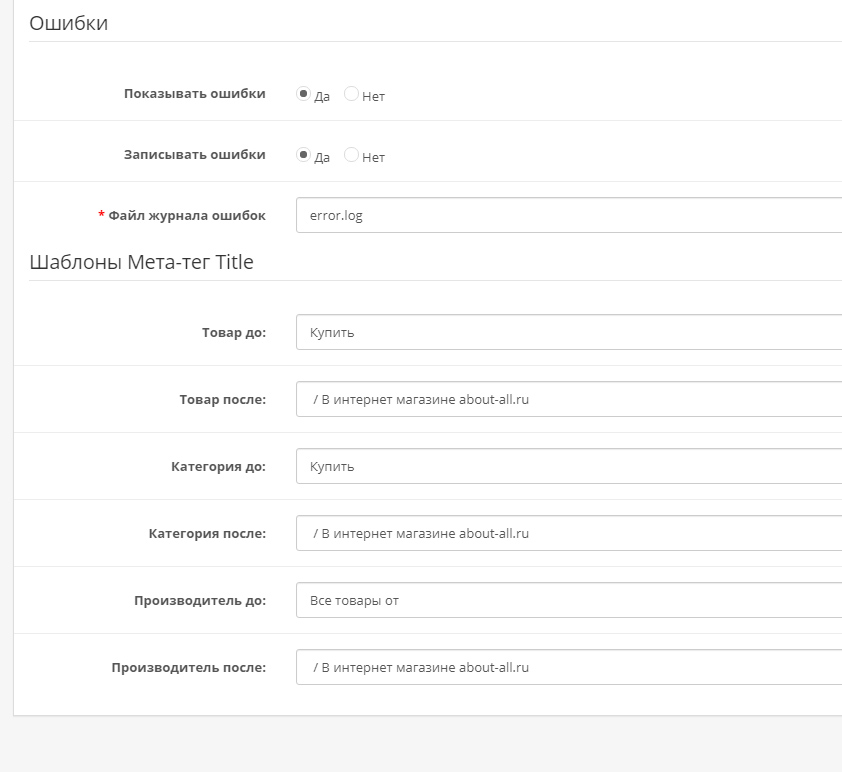
После заполнения нажимаем кнопку Сохранить.
5. Откроем файл product.php и вместо этой строки (217):
$this->document->setTitle($product_info['meta_title']);
вставим эту:
$this->document->setTitle($this->config->get('config_mt_beforeproduct') . $product_info['meta_title'] . $this->config->get('config_mt_afterproduct'));
6. Откроем файл category.php и вместо этой строки (93):
$this->document->setTitle($category_info['meta_title']);
вставим эту:
$this->document->setTitle($this->config->get('config_mt_beforecategory') . $category_info['meta_title'] . $this->config->get('config_mt_aftercategory'));
7. Откроем файл manufacturer.php и вместо этой строки (111):
$this->document->setTitle($manufacturer_info['name']);
вставим эту:
$this->document->setTitle($this->config->get('config_mt_beforebrand') . $manufacturer_info['name'] . $this->config->get('config_mt_afterbrand'));
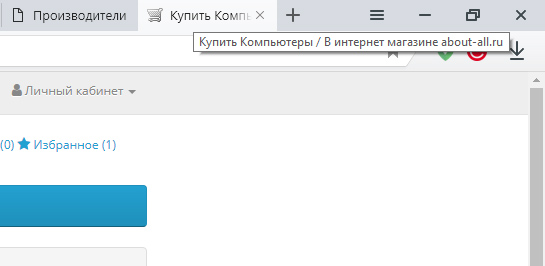
Чистим все кеши и проверяем что же у нас с вами получилось:
На сегодня всё, вступайте в нашу группу в ВК и следите за выходом новых статей.
Живой пример (обновляется одновременно с выходом новых статей): https://about-all.ru


2 комментария
А как можно сделать для несколько языков?
Добрый день, с мультиязычными сайтами редко работал, нужно смотреть. Проще всего нанять специалиста на кворке и он адаптирует код под мультиязычность.